On CCTV surveillance cameras, the Pan is rotated horizontally, allowing the camera to look left or right. Tilt is a pitch-up and pitch-down motion that raises or lowers the lens. For mechanical gimbals, these two actions change the lens orientation. Even if the gimbal can rotate horizontally continuously by 360°, the range of a single lens captured at a certain moment still depends on the orientation at that time, the lens field of view angle and the on-site occlusion. Federal Highway Administration CCTV Technical Manual
How do Pan and Tilt make the camera move respectively?
Take a gimbal camera mounted on a warehouse column as an example. The camera was originally facing the door, but the operator turned the gimbal to the right and moved the picture to the loading and unloading area next to it. This step was Pan. The camera rotates around a vertical axis, changing which direction it faces. After the camera moves to the loading and unloading area, it presses down to move the center of the picture from the carriage to the loading and unloading platform. This step is Tilt. The camera rotates around a horizontal axis, changing the angle at which it looks up or down. Federal Highway Administration CCTV System Validation Example
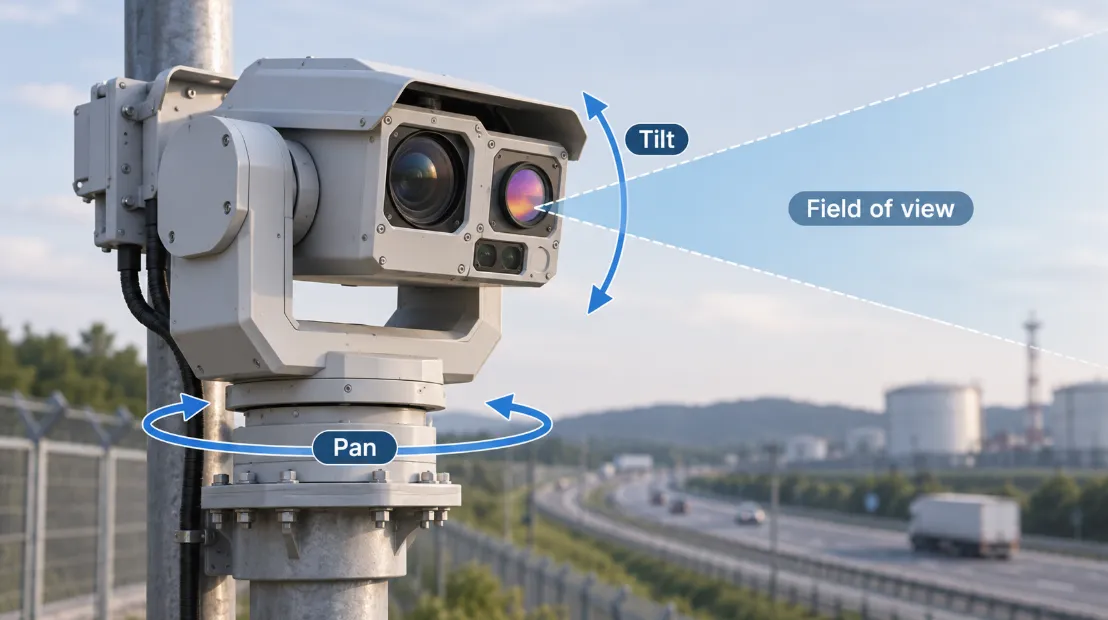
The electric gimbal can be integrated into the ball machine or made into an independent mechanism to drive the external camera assembly to rotate. If the specification sheet says Digital Pan/Tilt, you should confirm whether it refers to moving the cropping window within the captured image. ONVIF's PTZ specification defines this digital operation. It can move the target at the edge of the original screen to the center of the display screen, and the content that can be viewed is still limited to the original framing range. Federal Highway Administration CCTV Technical Manual · ONVIF PTZ Service Specification, Appendix A
How do you view the horizontal rotation angle, pitch range, and field of view on the specification sheet?
| Datasheet term | What to check |
|---|
| Pan range | The horizontal directions the camera can reach. If it must keep turning in the same direction after a full revolution, look for 360° continuous rotation. |
| Tilt range | How far the camera can point up or down. Check what 0° means and which direction the positive and negative values represent. Total tilt travel alone gives you too little information to tell whether the camera can see below its mount. |
| Field of view (FOV) | The horizontal and vertical angles captured in one frame. For a zoom lens, check the field of view at the focal length you plan to use. |
An example of road camera specifications in the U.S. Department of Transportation training materials lists the 360° horizontal continuous rotation and pitch range of the ball machine separately. During installation, even if the horizontal rotation can be aligned with the target orientation, it is still necessary to check whether the lens can be pressed down to the required angle and whether objects such as brackets and cornices are blocking the view. U.S. Department of Transportation ITS Training Materials, New York State Department of Transportation Specifications Example
How does Zoom in PTZ change the screen?
P and T decide where to look, and Z decides how big the target is in the picture. After the camera turns to the loading and unloading area, if you still need to see the numbers on the carriages, you can adjust Zoom again. Optical zoom magnifies a target by changing the focal length. When you get closer, the field of view usually narrows, and areas that were previously visible at the edge of the frame may be excluded. Digital zoom magnifies the acquired pixels. When the specifications only mention Pan/Tilt, if the project also requires optical zoom, check again whether the model lists the optical zoom rate or focal length range. Federal Highway Administration CCTV System Validation Example · ONVIF PTZ Service Specification, Appendix A
If the gimbal can be transferred, can two points record video at the same time?
Assume that the warehouse entrance and loading/unloading area are both within the rotation range of the same single-lens gimbal camera. After the camera turns to the loading and unloading area, if the door exits the current field of view, this video will not capture the entry and exit of the door. Even if the device supports preset cruise, the doorway can only be photographed during the time when it enters the camera field of view. FHWA Camera and Communications Equipment Report · FHWA CCTV Cruise Verification Example
The actual video footage can be used to verify the situation on site. Operate the camera according to the planned orientation and zoom rate, replay it to view the section of the loading and unloading area, check that the doorway is always in the frame, and whether the video can clearly see the required entry and exit details. If the doorway is painted and the project requires two points to be stored at the same time, it is necessary to add images that continuously cover the doorway along the way, such as using a fixed camera to guard the doorway and a gimbal camera to view the loading and unloading area. FHWA Fixed Camera and Steerable Camera Collaboration Study · FHWA Multi-Camera Research Report



 English
 日本語
 한국어
 français
 Deutsch
 Español
 italiano
 русский
 português
 العربية
 tiếng việt
 ไทย
 čeština
 dansk
 Svenska