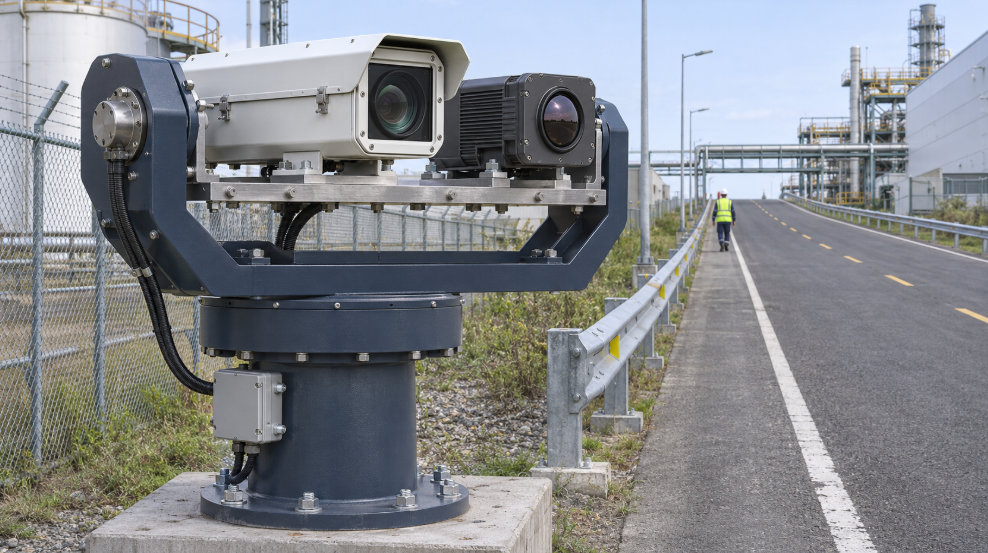
Someone walked from the loading and unloading port to the ramp, and a human detection box appeared on the monitoring screen. To see if the camera starts following, you have to look a few seconds further. The human tracking pan tilt camera (HTS) will continue to locate the person in subsequent frames. He walked to one side, and the gimbal rotated horizontally as needed. When a person goes up a slope, their position in the frame changes significantly, and the camera can pitch accordingly. Research on evaluating PTZ tracking
What is the difference between human detection, pre-position linkage and automatic tracking
Let's still watch this video of the loading and unloading port. The system can mark a box or issue an alarm when it finds someone. This step is called human detection. An alarm can also turn the gimbal toward the loading and unloading port. The pre-stored lens is oriented to the preset position, the gimbal is turned into place, and this call is completed. The person then walks towards the ramp. If the camera is still adjusting according to his position, the effect of continuous tracking can be seen. BIT-CCTV guide to pan, tilt, and tracking
These items are usually read separately in the specification sheet. Taking the BIT-S6307W as an example, human-vehicle target detection is listed in “intelligent analysis”, while single-scene, multi-scene, panoramic and warning linkage tracking are listed in “automatic tracking”. The two links can be connected and tested along the same route on site. First, see if the currently enabled detection rules can trigger tracking, and then see if the camera will follow after the person leaves the location that originally triggered the alarm. BIT-S6307W technical specifications
I can transfer the gimbal, why do I sometimes still lose it
The person was walking all the time, but the gimbal used to determine where to turn, but it was a newly collected picture. The system first estimates how far a person deviates from the predetermined composition position, and then issues instructions to the gimbal. After the camera turns, the system will look at the next frame to determine whether it needs to be adjusted again. Image analysis, command transmission, and motor operation all take time. By the time the camera starts to turn, the person may have already reached the edge of the frame. Even if the gimbal still has room to rotate, it may be lost this time.BIT-CCTV tracking system guide · Research on camera positioning and processing delays
If you zoom in, the margin left for the gimbal to correct will be small. The thermal imaging channel of the BIT-S6307W is an example, with the specification sheet giving a field of view range of 24° × 18° to 8° × 6°. The same person traversing the frame at the same speed will reach the edge of the frame earlier in a narrow field of view. When checking parameters, the horizontal rotation range answers where the lens can turn, and the field of view angle answers how wide the lens can be seen when facing this direction and using this focal length. If the project wants to zoom in on the scene during the follow-up shooting process, it will be completed using the zoom position that is actually used during acceptance. BIT-S6307W thermal imaging and pan-tilt specifications
Check if you can live with the same person using four-stage movement
Run the following four sections of the walk according to the project's proposed installation height, tracking mode, and zoom settings. When watching back, align the alarm record and video to find out when the system detected the person, when the camera started to turn, and who followed last. When two people cross or someone is briefly blocked, it is especially important to see whether the person reappearing in the frame is still not the original tracking target. Research on active tracking with multiple cameras
Field test
What to look for in the footage
Walk across an aisle
After triggering the alert, keep walking toward one side of the frame. If the camera moves to the preset and stops, the run confirms preset recall. If it keeps turning as you walk, the run confirms horizontal tracking along that route.
Walk up or down a ramp
Pick a ramp that makes the person move noticeably up or down in the frame. If the camera only pans and the person leaves through the top or bottom of the frame, check whether tilt tracking is enabled and whether the camera reached its tilt limit.
Have two people cross paths and separate
Start with the camera tracking Person A, then have Person B cross A’s path. Once they separate, see which way the camera turns. If it follows B, it switched targets, even if someone stayed in the frame the whole time.
Have the subject briefly disappear from view
Have Person A walk behind a column and reappear. Record whether the camera picks A back up, switches to someone else, or stops tracking. The footage shows how the current configuration handled that brief obstruction.
In the acceptance record, write the positioning and zoom settings next to the results. For example, in the loading and unloading port, you can directly record whether the camera can follow the same person up the ramp from the loading and unloading port at the actual installation height.
We use cookies to offer you a better browsing experience, analyze site traffic and personalize content. Part of the tracking is necessary to ensure SEO effectiveness, By using this site, you agree to our use of cookies.
Visit our cookie policy to learn more.



 English
 日本語
 한국어
 français
 Deutsch
 Español
 italiano
 русский
 português
 العربية
 tiếng việt
 ไทย
 čeština
 dansk
 Svenska